Recording you, always
Game DVR sits in the background capturing the last few minutes of every game you play, whether you ever save a clip or not. It costs frames on every machine and more on a weaker one. Off.
Windows ships recording your gameplay in the background, holding back a fifth of your CPU, and capping your network traffic. Nobody asked it to. Most people never find out.
Unlockery Optimizer names every one of those settings, tells you what it does in plain English, and lets you undo any of it with one click.
Instant delivery. Your key lands in your inbox the moment you pay.
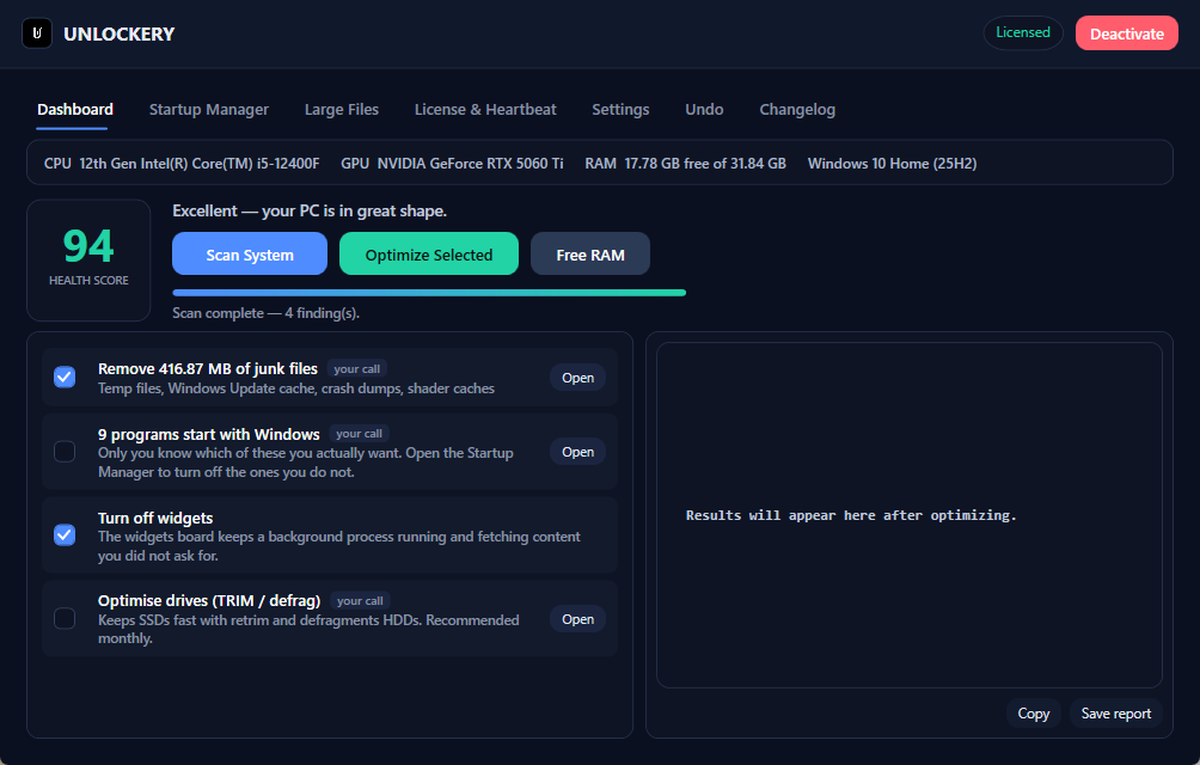
Named, so you can go and check any of them yourself.
Game DVR sits in the background capturing the last few minutes of every game you play, whether you ever save a clip or not. It costs frames on every machine and more on a weaker one. Off.
Windows reserves 20% of your processor for background tasks by default
(SystemResponsiveness). This hands it to whatever is in front of you —
which, when you are playing, is the game.
Windows limits multimedia network traffic to ten packets per millisecond
(NetworkThrottlingIndex), and delays packet acknowledgements by default.
Both get lifted. Both matter online.
Hardware-accelerated GPU scheduling lets your graphics card manage its own work queue instead of asking the CPU every time. Lower latency, steadier frame pacing. Off by default on most installs.
"Enhance pointer precision" moves your cursor further when you move the mouse faster, so the same flick never travels the same distance twice. Every competitive player turns this off. Most people do not know it is on.
High-precision timers restored on Windows 11, power throttling off, the performance power plan set, USB selective suspend and PCIe power saving disabled on mains. The boring layer that decides how evenly frames arrive.
Where the space on your game drive actually went.
DirectX shader caches, temp folders, crash dumps, Windows Update leftovers and browser caches across Chrome, Edge, Brave, Firefox and the rest. Caches only — you stay signed in everywhere.
Every launcher you have ever installed puts itself in your startup. Manage the whole lot from one list, and drop the ten-second delay Windows adds before it even begins.
Old installers, forgotten recordings, the ISO from a reinstall two years ago. You choose what goes, and anything you remove goes to the Recycle Bin rather than straight out.
You have seen the ones that promise +200 FPS and a picture of a rocket. They do almost nothing, they cannot tell you what they changed, and there is no way back. That is why the whole category has the reputation it has.
This one will not quote you a number, because anyone who does is making it up — what you gain depends entirely on how your machine was set up before. What it will do is show you every setting before it touches it, take a System Restore point, write down the previous value of everything it changes, and put any of it back from the Undo tab.
Where you will actually feel it: stutter and input lag more than the average FPS number. A frame counter that reads the same but stops lurching is worth more in a match than ten frames on the average.
One PC per licence. Cancel a plan whenever you like.
Sentinel watches your drives, your free space and your startup, and warns you before
something fails. Put a plan from both in your cart and the code
BOTH takes 20% off
the lot.
Nobody can tell you that honestly without seeing your PC, and anyone who puts a number on the box is guessing. A machine that has never been touched, with Game DVR on and fifteen startup programs, will feel properly different. A well-kept one will not. The app shows you what it found on your machine before you decide anything.
No. It changes Windows settings — the same ones you could change yourself in the registry and Settings app. It does not touch games, game files, or memory, and it does not inject into anything. Nothing here is visible to an anti-cheat.
It takes a System Restore point before it changes anything, and logs every setting it touches so the Undo tab can put it back. It does not remove Windows components, disable security features, or touch anything that needs a reinstall to recover.
It only ever deletes caches and temp files. In the Large Files tab you choose what goes, and anything you remove there goes to the Recycle Bin rather than being deleted outright.
On a monthly or yearly plan, yes — the app checks your licence is still active. The lifetime licence is a one-off payment and keeps working, including future updates.
Not on a single-PC licence — a key works on one machine. The 3 PCs plan covers three, which is the honest answer for a desktop, a laptop and the machine in the other room.
Your key appears on screen and in your inbox straight away, along with the download. Install it, paste the key, done.
Instant delivery, and every change it makes is reversible.
Choose a plan