Windows 10 & 11

Your SSD is keeping a diary. Nothing reads it.

Every drive in your PC records how much of its life it has spent, how hot it runs and how much has been written to it. Windows collects all of it and shows you none of it.

Sentinel reads it straight off the drive and tells you what it means — while the drive is still readable, not after.

Instant delivery. Your key lands in your inbox the moment you pay.

WD Blue SN580 1TB

NVMe • C: • 931.5 GB

HEALTHY

Healthy. 97% of its rated write life is left.

TEMPERATURE52 °C
POWERED ON4,702 hours
WRITTEN68.7 TB
SPARE BLOCKS100%
A real drive, read live. Every figure comes from the drive itself.

What it actually tells you

Four things, all of them specific. No score out of a hundred.

How long your drive has left

Solid-state drives report how much of their rated write life is gone. Sentinel reads that, watches how fast it moves on your machine, and turns it into a date — not a green tick. Older drives report reallocated sectors instead, which is the classic sign of one on the way out.

What is slowing your startup

Windows times every boot and quietly writes down which programs, services and drivers held it up, and by how many seconds. It has never shown anyone. Sentinel does — by name, with the company that made it.

When you run out of space

Not "your disk is 90% full". An actual answer: this drive fills up in about 23 days at the rate you have been using it — worked out from your own history, not a rule of thumb.

Why your laptop stopped lasting

Battery packs lose capacity. Sentinel reads the original design capacity and what the pack holds today, so "it used to last all afternoon" turns into a number you can act on.

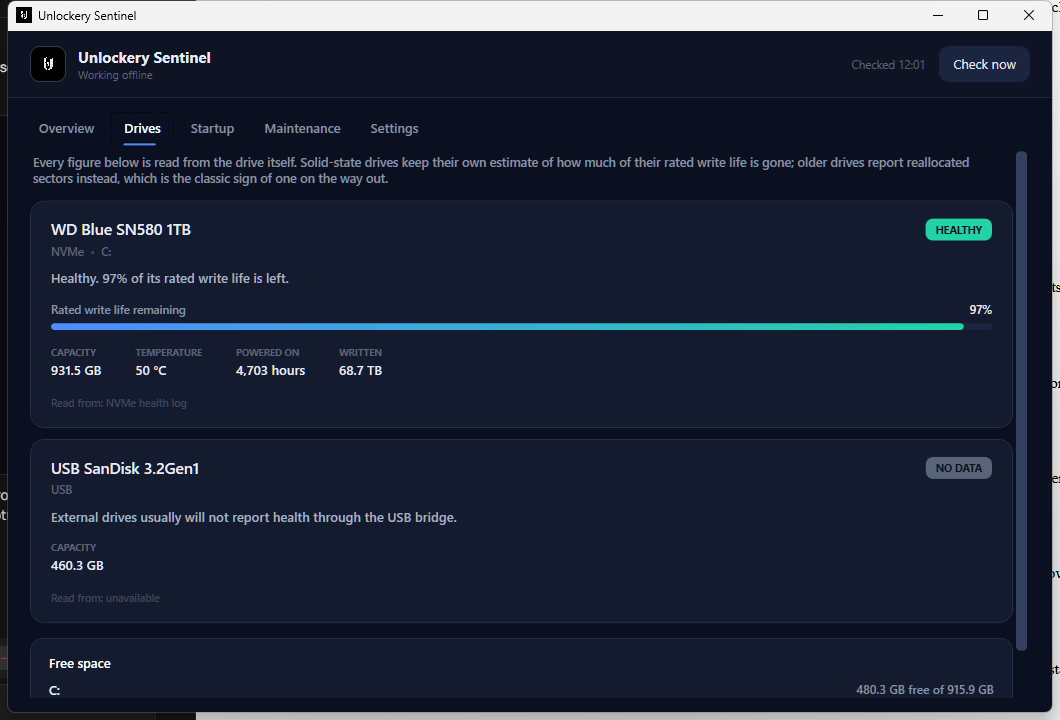
The Sentinel Drives tab showing a WD Blue SN580 at 97% rated write life remaining, with temperature, hours powered on and total data written, and a USB drive reporting no health data
The real app on a real machine. The drive on the left is reporting its own numbers; the USB one underneath is honest about not being able to.

The one nobody expects

Windows has been grading your startup this whole time. Every restart, it measures how long each program took to load and compares it to how long that program usually takes. When something is dragging, it writes down the name, the company and the delay.

That log is on your PC right now. It needs administrator rights to open, so almost nothing reads it — and no consumer tool shows it to you. Sentinel opens it on the first run and tells you which app has been costing you four seconds every morning.

And it watches while you play

So when a match feels bad, you can find out whether it was you.

It knows when you are in a game

Windows flags a fullscreen game, and Sentinel picks that up — verified against Rainbow Six Siege. It records the session quietly and stays out of the way: no overlay, no injection, nothing that touches the game or its anti-cheat.

Then tells you what the PC did

How long you played, how hard the CPU worked and how fast it actually ran, how hot the drive got, and whether memory kept climbing the whole time — which is why some sessions get worse the longer they run.

Including where your ping comes from

It splits your latency in two: the part that is your own network, and the part that is the route to the server. It also tracks jitter, which is what rubber-banding actually is — a steady 60 ms plays better than a 30 ms that keeps jumping.

And it can keep on top of it for you

Every one of these is off until you switch it on.

When Windows starts

Clear out temp folders, crash dumps, error reports and the shader cache — all of it rebuilt on demand. And the Windows Update download cache, which is often several gigabytes of installers Windows has already finished with.

While it is running

Windows Update and some drivers quietly put your power plan back to Balanced. Sentinel checks every few minutes and sets it back. It also runs the clear-out early, without waiting for a restart, if a drive drops below a tenth free.

Without ever getting in the way

It does none of it while a game or anything else is fullscreen, and it never touches a file that anything has opened in the last twenty-four hours. Whatever it does, it writes down — with the date and how much it recovered.

What it does not do

Sentinel does nothing to your PC until you tick a box, and what it will do then is deliberately short. No registry tweaks, no disabled services, no "boost". An action that runs unattended at seven in the morning with nobody watching has to clear a much higher bar than one you click and can undo — so only the few that are safe to repeat forever are here. For the rest, with a restore point and an undo tab in front of it, that is what the Optimizer is for.

It also will not tell you your CPU temperature. Reading that honestly needs a kernel driver, and a made-up number on a health dashboard is worse than an absent one. What it will tell you is when Windows is holding your processor below its rated speed, which is the thing you actually wanted to know.

It will not reduce your ping. Nothing installed on your PC can. The time a packet takes to reach a game server is distance and how your ISP routes there, and no setting changes either — anything sold as a "ping reducer" is selling you that lie. What Sentinel does instead is tell you how much of your ping is your own network, so you know whether there is anything to fix at all. On a decent wired connection the honest answer is no, and it says so.

Drives connected over USB usually cannot report health at all — the bridge in the enclosure does not pass it through. Sentinel says so rather than showing you a reassuring green tick it has no basis for.

Pricing

One PC per licence, or three on the family plan. Cancel whenever you like.

Questions people actually ask

Can it really tell my drive is going to fail?

It can tell you what the drive says about itself, which is the same data the manufacturer's own tools use: write life spent, spare blocks left, sectors that could not be read, and the drive's own failure prediction flag. That catches wear and gradual decline, which is how most drives go. It cannot predict a controller dying suddenly — nothing can. Keep backups either way.

Why does it need administrator rights?

Because reading a drive's health record and opening the boot performance log both require them. There is no way around it. Sentinel asks for nothing else and writes nothing to your system beyond its own history file.

Will it get me banned? I play games with anti-cheat.

No. Sentinel never touches a game. It reads system-wide counters that Task Manager reads, your drive's own health log, and the title of whichever window is in front. It opens no process, reads no memory, injects nothing and draws no overlay. There is nothing for an anti-cheat to object to — it was built and tested alongside Rainbow Six Siege running.

Does it show my FPS?

No, and it will not pretend to. Reading a game's frame rate honestly means hooking into it, which is exactly the thing that gets people banned. Sentinel measures the machine around the game instead — the CPU speed, the drive temperature, the memory, the connection — which is where the causes of bad frames actually live.

Does it slow my PC down?

It does a full check four times a day and sits idle in between. A check reads a few hundred bytes from each drive and takes well under a second.

Does my data go anywhere?

No. The history lives in one file on your PC. The only thing Sentinel sends over the internet is a check that your licence is still valid.

How long before it is useful?

The drive health, the startup list and the battery reading are all there on the first run. The forecasts — how fast a drive is wearing, when a disk fills up — need history, and start appearing after about a fortnight of it running.

Can I use one key on my desktop and my laptop?

Not on a single-PC licence — a key works on one machine. The 3 PCs plan covers three, which is usually the honest answer for a desktop, a laptop and the machine in the other room.

I already have the Optimizer. Do I need this?

They do different jobs. The Optimizer is the deep clean you run and watch, with a restore point and an undo tab behind it. Sentinel is the bit that never needs running — it watches for what goes wrong slowly, and quietly keeps the few safe things tidy on its own. Plenty of people want one and not the other.
Ready?

Instant delivery. It reads your drives on the first run, before you have to trust it with anything.

Choose a plan